Add to Technorati Favorites
Showing posts with label Vista. Show all posts

Wednesday, 14 November 2007

Microsoft FINALLY wakes up to podcasting...

I read with interest yesterday that Microsoft have finally got round to adding podcast support to their new Zune players, so I thought I'd have a look into it to see how the support fared against that found in iTunes.

I have a very love/hate relationship with iTunes - it seems to be getting slower and clunkier with every new version (I use it on windows, I understand it works much faster on Macs, but go figure), it looks ugly, and for such a huge company, the visualizations are laughable to say this has come from a huge company with such a huge budget when compared to single-man programmed vis's like Milkdrop (Winamp) or Twisted Pixel (Windows Media Player), which I can watch for hours and not see the same effect twice, and they're silky smooth. On top of that, not only does iTunes act slow, but it also slows your entire system down to a crawl as well (and this is on a 2.4Ghz Dual-Core with 2Gb RAM)! On the other hand, iTunes has pretty much been the one piece of software that has made downloading and listening to podcasts a no-brainer, which is really what it needed. Finding a podcast you want to listen to in iTunes is almost simplicity itself, and the reviewing system is helpful for finding out if a podcast is a waste of time, or other similar podcasts. Whilst making podcasting nice and easy for users though, iTunes is still lacking a lot of developer-end features like the ability to see easily how many people have downloaded and listened to your podcast, as well as basic HTML formatting in the descriptions for the episodes.

For my main media player right now, I've been using Media Player 11, which looks pretty, I can control from my taskbar, has good visualizations (once you've installed Twisted Pixel or something similar), rips super-fast and at decent quality (very important for a DJ), and the search is nice and fast also. I used to like Winamp for all my tunage needs, but even this has got a bit slow on the old search function in recent versions - but I can forgive that with them having a team of developers smaller than Microsoft's cleaning staff. The only downside to Media Player is that it has absolutely no podcast support, which is a real shame, and I'm sure would stop a lot of podcasters/listeners having to rely on iTunes just for this function (and I know a lot that do).


I decided to give the Zune software a try, if only to see how it fared against iTunes and Media Player. Installing it was no problem, and the download was less than half the current size of iTunes. It took about the same time to install as iTunes, but was much quicker to load once all my tracks were loaded into it's library (currently around 20k tracks). Interestingly, there was no feature to just work with Media Player's library, meaning that you have to go through the import process again, and the 2 libraries have to be maintained separately, which was a bit of a bummer.

The interface, whilst a little confusing at first looks beautiful, and you can choose from about 8 themes if you don't like the girly default one. It seems strange to me that the Zune2 players look very masculine, yet the software looks very feminine. It also seems strange to me that Microsoft would not just bolt the Zune syncing, podcasting and picture features into Media Player, which people will probably be using already if they don't have iTunes (which, if they're buying a Zune, they probably won't). All the menus fade in and out smoothly, or slide around, and compared to the grey boredom inducing look of iTunes, it really is quite refreshing to behold. It will not only allow you to organize and play your music, but your videos and pictures as well. The pictures part is especially nice for showing off your pics, as the interface is there over the top of the pictures, but doesn't get in the way, so you can see your pictures take up the full screen (with all the fady wizzy slidy effects you could want, it's all very pretty). Finding how to get to the podcast directory took me a bit of time, as the Zune software separates what's currently on your computer from what's on the internet, so going to your 'collection', then clicking on podcasts only shows you your current subscriptions, and their episodes. To get to the directory you first have to click on the marketplace (which I didn't think I could as Microsoft wouldn't let me create an account because I was born in the wrong part of the world), then on podcasts. This is a little confusing, as the assumption is that anything in the Marketplace is something you have to pay for, which is something which is invariably not the case with podcasts.

Once you've found it, the podcast directory is nice to look at, but quite slow to load, even though it loads the podcast artwork after the page has loaded. At the moment, the directory is pretty sparse compared to Apple's huge directory, but it's early days yet. Apple are very good at keeping up with podcast additions to their directory, I've just submitted Ruforia to the Zune directory, so we'll see how long it takes to show up. Choosing a podcast to subscribe to is very similar to iTunes, although once you're on an individual podcast's page, it seems to take an age before you get a list of the actual episodes within that podcast. Clicking on an episode does show the description in place of the actual series description, which I think is much better in usability terms than the iTunes method of clicking the small grey 'i' next to the episode (which you'd be surprised how few people know how to use). Aside from the general lack of speed accessing the podcast details, the only other downer is that people can not review podcasts like in iTunes. What would have been one better for Microsoft would have been the ability to discuss in a forum-like manner podcasts and individual edpisodes (since they seem so hell bent on creating yet another social network... can't they have one social network that you can bolt extra components onto as you need/want rather than a million different ones... xbox live, MSN messenger, Zune, Live Spaces, it goes on...). Other minor gripes in what would have otherwise been a pretty decent media player:

  • Editing Track/Artist information in the library list view is a complete pain, and really slow.
  • What's with the girly pink/orange bar along the bottom of the window all about?
  • Why can't Microsoft program software that conforms to it's own UI guidelines? Every other program has a drop-shadow under Vista now, except the Zune software :s
  • On that note, why could they not have given it a full-size Vista icon?
  • Ok, I realize that this is primarily software designed for use if you have a Zune player, but could they not have all the 'device' options hidden until you register a Zune player with the software so that they don't get in the way. iTunes doesn't show any iPod options unless you actually have an iPod connected to it. Much less confusing for newbies.
  • It's actually harder in the Zune software than in Media Player to add album art to tracks. Can't someone invent a nice easy way to batch add album art to your tracks???
  • They've pretty much covered everything (almost) iTunes does in terms of podcasting and nothing more, how unimaginative.
  • Why do all the titles have to be in huge capitals? Most podcasts/tracks end up being cropped off the edge of the window. I can read you know, Microsoft.
  • No 'Users also liked...' function? Have we not established this is a Good Idea® if you want more business by now?
  • Only 3 levels of rating?? Every music software that uses the ratings system uses 5 stars! Oh and we've changed it to hearts/broken hearts to rate the tracks? I'm sorry, but just because I don't like a track doesn't mean that I've had my heart broken by it, I don't get all emotional just because a crappy Trance track has wormed it's way into my collection.
  • No visualizations??
  • Not only does it not tell me the title of the track currently playing in the task bar, but it doesn't allow me to control what's going on without maximising the application first. This wouldn't be so bad if it took any notice of the multimedia keys on my keyboard, but it doesn't.
  • Would it have been so hard to install a little sidebar gadget for Vista along with the software, so that you can see when new podcast episodes are available? It seems like it's just going to be another of those technologies that Microsoft heralds as the feature that will change the world, and then not make use of it in it's own programs.
One really thankful thing is that the Zune software actually reads the iTunes tags in the podcast definition file, instead of requiring it's own XML definitions. That could have been a lot more painful for everyone concerned. But apart from all that it could be a really good podcasting alternative to iTunes about 10 years down the line. By which time iTunes will have moved the goalposts again of course!

Wednesday, 12 September 2007

Iconologist Pt. IV

I gave up trying to make a Vista Traktor icon from just the logo - it looks a bit bland when scaled to that size, so instead I grabbed my record box, and after a bit of photoshopping, this was the result:
If anyone wants to use this icon, you can download it here. I hope you like it!

Iconologist Pt. III

I ended up getting so pissed off with the whole fireworks not having a Vista icon thing, that I photoshopped a set up quickly, I'll probably redo this, but if anyone wants them in the meantime, I've made up a pack of them, as well as the Firefox Vista icon which you can download for StarDock Icons by Shaun Taylor here (I've converted it to a .ico file so you can use it on the Vista Desktop).

Download the icon pack
- I hope it works out for you!

Iconologist Pt. II

After the wierd behaviour of Vista earlier, I had a play about with my icons again, and it just got wierder! If I right click an icon, and go to the properties for the shortcut, and choose any other icon from the box, then click ok, and hit apply in the properties box, the icon will go back to it's normal size, with transparency. I even found that Photoshop does have a Vista icon, but Fireworks definitely doesn't, which leaves my little icon arrangement looking a little jilted:

Iconologist

I seem to be having one problem in Vista already. In my eternal quest for customisation, I found a page on the net that tells you how to make your icons bigger in Vista by holding down ctrl and scrolling the mouse wheel. Using this method, you can pretty much make your icons as big as you want, and the Vista icons will scale up and still look good, as they're designed at a much higher resolution. The only thing I don't like about this is that the shortcut icon scales as well, eventually looking huge! I don't like the Vista shortcut icons at all, and will be getting rid of them as soon as I have chance.

Make your Recycle Bin big enough to fit all the useless crap that comes preinstalled on your new notebook into.

I did this, and had the icons on my desktop looking nice and big, and ready for action. Funnily, Flash and Dreamweaver (CS3) both had the updated large Vista icons. Fireworks and Photoshop didn't. Come on, Adobe, that's just slack!

Then, suddenly, without having done anything, the non-vista icons went back to a smaller than normal size. Now I can't seem to get them back to even their normal size, and they've lost their transparency! I was going to redesign them anyway, but this seems really wierd behaviour! Has anyone else had the same thing happen to them?

Same desktop, wildly different sized icons!

Vis a Vista

Well, my new lappie is all up and running now, and all ready to ship out to Ibiza with me and Marisa. I have to say that the customer service from laptopsdirect.co.uk (I won't grace them with a link) was absolutely appalling from start to finish.

First, after paying for next day delivery, it took nearly a week to arrive. They said it was because I'd ordered a recovery DVD, which they had to burn with the laptop - could it have hurt to inform me this when ordering, instead of after having to phone up 5 days running and spending nearly an hour on hold each time?

Then, when it arrived, it came with only 1GB of RAM instead of the 2GB I'd ordered and paid for! When I phoned them up to tell them about this (and spending another hour on hold to get through to someone of course), they had the cheek to ask me why I thought the laptop only had 1GB of RAM. I was like "well, there were 4 clues really - first, it said on the delivery note it only had 1GB, then it said on the box itself, then there was a big sticker on the keyboard telling me the same thing, then control panel told me when I opened the laptop for the first time!".

Then they went through a phase of telling me that they would be unable to accept the laptop back to fit the new RAM, as I'd already opened the box. I told them I'd paid for 2GB of RAM, and that's what I was going to get, and that I wouldn't send it back to them anyway, as I might never get it back in time before I left the country. After escalating the situation twice to the next supervisor up, they asked me how I'd like to see the situation resolved, as they were at a loss what to do. I told him to just send me the memory module, and I'd fit it myself. Finally they decided that it wasn't worth the effort any more, and agreed to this.

Now the laptop is all up and working (with 2GB RAM present and correct), I can tell you about Vista. Vista is basically XP, prettified with different bugs. I'm pretty ambivalent towards it to be honest, whereas when XP came out I was pretty excited, because we were getting rid of that horrible Windows 95/98 programming. Aero (the new Vista interface) is nice, I'll give you that. Everything is all very clear, and drop shadows behind windows are well overdue in my opinion, having being around on the Mac and Unix for donkeys years. They really have tarted up the XP interface a lot, but it comes at a price - you need a stupidly beefy graphics card just to be able to see all the snazzy effects. My laptop came with 512Mb GeForce card, so it was ok, but if you have a bog standard card, you pretty much get something that looks like a gay version of XP. Fuck that for a game of tin soldiers. Vista also sucks more RAM than Paris Hilton has sucked willies. There was a huge difference in performance between running the computer with 1GB and 2GB. In fact, from a clean startup, with no programs running, and Aero turned on, my computer was using 90% of 1GB, which is appalling, Bill.

Windows Media Player 11 - which seemed to run fine in XP, and I'd take any day over the bloated beast that iTunes has become - has become slow and crashy in Vista. I assume this is something to do with the fact that it's checking out all my music's DRM (or lack of it) and Window's march against non-DRM files (which is completely the opposite the the way the industry is headed, so why bother MS?). I think I'll be installing Winamp again very soon.

This audio-crippling spills over to all Audio applications, including Traktor, and the Direct Sound drivers for not only my onboard Realtek card, but also my Creative X-Fi Notebook card couldn't be set up with any degree of reliability or decent sound quality. Unfortunately there was also a lack of ASIO for the X-Fi card, which I didn't realize at the time when I ordered it. Stupid Creative - they made ASIO drivers for the Audigy 2 (which I used for DJing for nearly 2 years, which was why when I found that the X-Fi was pretty much the only PCIe compatible multi-out sound card, I had no problem with it), why not this one? Luckily, after a bit of fiddling, I managed to get ASIO4All working with my card, which actually allowed me to use both the onboard card and the Creative one simultaneously in Traktor, meaning that I don't have to use the splitter box from Creative after all (which they also failed to mention wasn't included in the price of the card, so I had to pay an extra £20 to get this, thinking I would need it for DJing). The ASIO4All solution works perfectly, and I now have my latency in Traktor down to 5ms, with no glitches in audio, and super-smooth wave display in Traktor. You can tell that the Core2Duo processor is so much better for these types of programs - before it would take about 5-10 seconds for a track to load into a deck, and there'd be a huge surge in CPU activity. On my new lappie, it loads pretty much instantly, and with the ASIO drivers, I'm able to run all 4 decks at once, with effects, timestretched at full quality, and the preview deck going as well, and not have the slightest drop in audio. The CPU usage meter stays below 25% the whole time. Amazing :) It amuses me that one man programming ASIO4All in his spare time has created something far more stable and usable than a whole team of Microsoft programmers (and there must be at least a few hundered) working on Direct X and Direct Sound.

So there seems to be a lot I don't like, or I'm ambivalent about towards Vista, what do I actually like? Well, as I've said before, the interface is nice, and I do care a lot about interface design. I like the nice big icons you can have (more on this in a minute), one thing I like more is the feedback the interface now gives you: If folders are going to take any amount of time to do anything, the percentage completed is shown as a green bar in the address bar. The address bar in folders has been re-thought, so that you only have to click the folder name in the heirarchy, and you'll be taken back to that folder - much better than clicking the "up folder" button loads of times. Also next to each folder in the heirarchy, there's a little arrow you can click to give you a list of sub-folders in that folder, making navigation very quick once you get used to it.

Instead of the super-slow search command in XP, there's now a search box in every folder (like firefox), which shows the results pretty much instantly, thanks to Vista's indexing of all your files while the computer is idle. I also like the fact that you can tag your files, which I think will eventually make folders obsolete - no need to organise things into different folders, just assign them relevant tags, and you can see everything related at once, even if some things can be grouped into more than one category.

The windows sidebar is a bit of an anti-climax, especially since Google Desktop has had the same functionality for years. There's nothing new here that hasn't been done better already, and without a major change to your operating system. Likewise with the windows picture album thing - Picasa does the same thing better, faster, and with Web Albums, don't even bother with the windows version. Internet Explorer 7 is the same as it's always been: a big pile of poo. I installed Firefox straight away before my system became riddled with spyware. Speaking of which, there's a spyware blocker built into IE7, but since I use firefox, I don't see a need to use it. There's also this thing called UAC, which blacks out the screen and asks you if you meant to do this every time you try to install a program, or delete a file or pick your nose or whatever. I turned it off as soon as I found out how.

One thing I did appreciate was the fact that Microsoft have finally included a screen grab utility - this must have taken about 10 minutes to program, but finally it's there! It beats having to Alt-Print and paste into MS Paint any day of the week. It also allows you to annotate screen captures.

There's a lot of things that are in different places in Vista - for example the menubars in folders are below the address bar (uh?), or "Add and Remove Programs..." has now changed to "Programs and Features" (which took me about 10 minutes to find). Some of these changes are difficult to understand the reasoning behind. Some less so - eg. instead of having a seperate "Run..." command in the start menu, you just type straight into the search box, and hit enter. You can also type web addresses in here, or names of programs and files, and the results will be shown in the start menu as you type.

Do I like it? It's memory hogging, slow, and still feels unfinished, but the same can be said about every previous version of windows, and hardware is catching up to be able to cope (as it always has). There's a couple of nice features, but nothing that will make you go "WOW!" like Microsoft's advertising would have you believe - more stuff that you see and think "I can't believe it's taken this long to get that", or stuff that you've already seen done better somewhere else (Apple, Google etc), so the impact is lost really with Vista's version. I'll keep with it for now - Traktor seems to be running fine in it, and that's all I'm really bothered about, so we'll see how things go from there.

Thursday, 14 June 2007

Virgin or Extra Virgin?

Marisa is having a conversation with Lulu opposite me about the easiness of carrying out a full-scale gang-bang whilst covered in olive oil. Personally, the easiness of that situation is not something I'm entirely worried about, surely in a full-scale gang-bang situation (as and when one of those arises), the guy/girl ratio is the only thing that you should be truly worried about. Lets face it, when placed in that kind of situation, you just want to be sure that you're not going to turn round one second and end up with a steaming pile of cock in your face through no fault of your own. It's a valid problem.
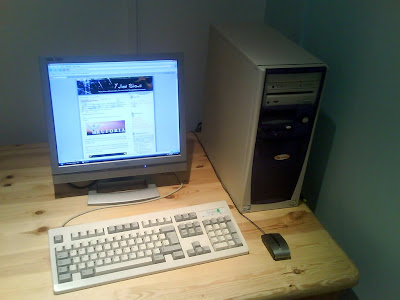
Despite all the gang-banginess in the air, my thoughts are elsewhere at the moment. You know how when you split up with someone, you should never, under any circumstances ever ever ever go back to them? Well does the same thing apply with keyboards? I've just set up my old computer (Maureen is finally coming out of retirement!) so that Marisa can fill it up with pictures of herself and lace and stuff (That's what having a girlfriend is all about - but if you can confine all that kind of thing to one computer, you're pretty much in the clear - today's top tip), and I dug the old keyboard from the RiscPC out (oh, if only your power supply still worked...). I forgot how nice and worn in this keyboard is. Every time you type on it, you just feel the Testostogeek coursing through your veins. The sound tells everyone listening "here is where man types". I'm almost entirely certain that God typeset the Bible on this particular keyboard. If only it worked on my laptop, I'd steal it from Maureen, and make Marisa type with Character Map.

So after installing my extra special version of Windows (it looks like Vista, but it's not... woo... the mystery continues), Maureen is all working again (I think she had a virus before - it would restart itself for no reason every 15 seconds), and I managed to stop it beeping constantly all the time - nice quick fix, I just unplugged the onboard speaker.

That probably means that Maureen is going to overheat and blow up at any moment, but She's not my problem any more ;)

Friday, 20 April 2007

Just as I thought. There's WD40 in my ear.

As you've probably worked out from the fact that my blog's looking less like a powerpoint presentation, I managed to get Photoshop working :) I'm a happy bunny.

I tried the new Photoshop, CS3, yesterday. It was pants. It ran slower than a dog with no legs. It was a beta though, but it doesn't seem to have that many new features that will make my life easier in terms of web design, so I might not bother looking at it when it officially gets released.

Actually, this is probably what will happen, my curiosity for all things new and shiny will get the better of me, and I'll install it anyway, then I'll find out that it still runs as slow as a dog with no legs, then I'll wonder why I bothered.

Why is it that as they get older, instead of getting faster (as new, faster programming techniques are discovered), programs get slower? Look at Windows... to a normal person, Vista doesn't do much more than XP (I think they might have upgraded solitaire), yet I could starve to death in the time it takes it to do most things. I think Microsoft have run out of ideas when it comes to Windows anyway, in which case, for the next version, please could you do absolutely nothing, apart from tidy up your programming and make it faster please? I really don't care about flipping things in 3D or translucent windows, not if it's going to make my system grind to a halt. Back in the day when I had a 33Mhz 486 running Windows 3.1 it used to take about a minute to load. Now I've got a 3.4Ghz Intel 4 with Windows XP, and it still takes a minute to load and it's supposedly 104x faster than that first computer. If Windows 3.1 worked on this computer, it should take around 0.5 seconds to boot.

Shame I don't have a floppy drive to install Windows 3.1 ;)